
The right CO₂ laser marking machine can significantly improve your production efficiency, marking quality, and overall business profitability. Whether you’re personalizing leather goods, engraving wood products, or marking plastic parts in bulk, understanding the key specifications will help you choose a machine that truly matches your business needs.
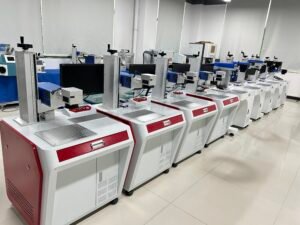
This comprehensive article breaks down the critical specs of CO₂ laser marking machine’s—power, marking area, lenses, speed, and voltage—so you can confidently select the correct laser machine model for your commercial or industrial application.
Why Choose a CO₂ Laser Marking Machine?
CO₂ laser marking machines are the ideal solution for organic and non-metal materials, offering high speed and clean results on a wide range of substrates, including:
-
Leather
-
Wood
-
Acrylic
-
Rubber
-
Papers & Cardboard
-
Plastics
-
Coated/painted metal

If your business involves product branding, industrial labels, date coding, promotional gifts, or custom engraving, a CO₂ system is one of the most versatile and cost-effective tools you can invest in.
Key Specifications You Must Evaluate on a CO₂ Laser Marking Machine
Choosing the best CO₂ laser marker configuration requires a careful look at six main technical specifications.
Laser Power (20W / 30W / 50W / 100W)
Laser power is the most crucial factor, determining how deep, fast, and efficiently the machine marks your material.3
| Power Guide | Ideal Application |
| 20W | Fine marking on plastics, rubber, coated metals (low-volume detail work). |
| 30W | Best for leather goods, packaging marks, and QR codes (versatile commercial use). |
| 50W | Strong for deeper wood engraving and faster production speeds (medium to high-volume). |
| 100W | Industrial-grade for bulk manufacturing and thick materials (maximum speed/depth). |
A simple rule: Higher wattage = deeper engraving + faster marking + higher efficiency. If your work involves high-volume orders or thick organic materials, choosing 50W–100W can dramatically reduce production time.
Marking Area (110×110 mm to 300×300 mm)
The marking area is defined by the F-theta lens attached to the laser head. Larger areas allow more flexibility for bigger parts but may slightly reduce detail resolution.
| Lens/Area Options | Best Use Case |
| 110×110 mm | High precision for small logos and serial numbers (accessories). |
| 160×160 mm | Best balance of detail and workspace (standard configuration). |
| 200×200 mm | Good for medium-sized products (wallets, small signage). |
| 300×300 mm | Large surfaces, signage, and batch processing (high-volume sheet work). |
How to choose the right area: If you work with small accessories (USB drives, wristbands, key tags), a 110–160 mm area is perfect. For leather panels, packaging, or larger sheets, go with 200–300 mm.
Marking Depth (0.01–2 mm, depending on material)
Marking depth varies based on:
-
Material hardness
-
Laser wattage
-
Focal lens
-
Marking speed
For businesses offering branding or personalization, a shallow 0.01–0.2 mm mark is usually sufficient. For deeper engraving on wood or thick acrylic, higher wattage is highly beneficial.
Marking Speed (Up to 10,000 mm/s)
The speed of a CO₂ galvo system is a major advantage. A high-speed machine translates directly to:
-
Faster order fulfillment
-
Lower labor costs
-
Higher daily output
-
More profitability
Even at maximum speed, the galvanometer head maintains excellent marking precision, ensuring quality is not sacrificed.6
Lens Selection (The Most Overlooked Factor)
Each marking area requires a specific F-theta lens, which critically affects:
-
Spot size
-
Marking detail (DPI)
-
Focus stability
-
Working distance
General rule: Small lens = high precision. Large lens = large area but slightly lower precision. For industrial or artistic detail work, stick with smaller lenses. For larger production items, use 200–300 mm lenses.
Voltage Compatibility (220V/50Hz)
Most CO₂ marking machines, including portable models, standardly operate on 220V/50Hz.
If you are operating in the U.S. or other areas with 110V:
-
You will need a 110V → 220V transformer, or
-
A factory-configured 110V option (if available).
Stable power is essential for consistent beam output and a long laser lifespan.
Matching CO₂ Laser Marking Machine Specifications to Your Actual Business Needs
Here’s a simplified recommendation table to help you configure the ideal CO₂ laser marker for your specific application:
| Business Need | Recommended Power | Best Marking Area | Notes |
| Leather products (wallets, coasters, belts) | 30W–50W | 200×200 mm | Strong contrast, good depth for durable leather marking. |
| Acrylic signage & crafts | 50W–100W | 300×300 mm | Higher power and larger area needed for cutting and big pieces. |
| Rubber wristbands & silicone items | 20W | 110×110 mm | Fast, clean marking on small, non-metal accessories. |
| Industrial date coding on packaging | 30W | 160×160 mm | High-speed small text required for production lines. |
| Promotional gift engraving (mixed materials) | 30W–50W | 200×200 mm | Flexible and efficient for a variety of custom orders. |
| Wood engraving (deep/high contrast) | 50W–100W | 200–300 mm | Requires stronger power for deep marking and burning into wood. |
Your final selection should depend primarily on what you engrave most often and your expected production volume.
Portable vs. Desktop CO₂ Laser Marking Machines
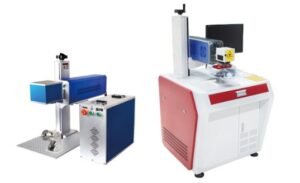
CO₂ marking machines are generally available in two primary formats, both utilizing the same core laser system:
-
Portable Galvo CO₂ Marker: Lightweight and easy to move, making it great for workshops or mobile engraving services. Ideal for customization shops with limited space.
-
Desktop CO₂ Marker: Features a more stable, enclosed design, better suited for high-volume factories or continuous, long-duration production runs where stability is paramount.
The choice between the two depends entirely on your workspace and workflow.
Final Recommendation
Choosing the right CO₂ laser marking machine is all about understanding your materials, marking area needs, and production volume. With options ranging from 20W to 100W and marking areas from 110 mm to 300 mm, you can select a configuration that provides the perfect balance of speed, precision, and efficiency.